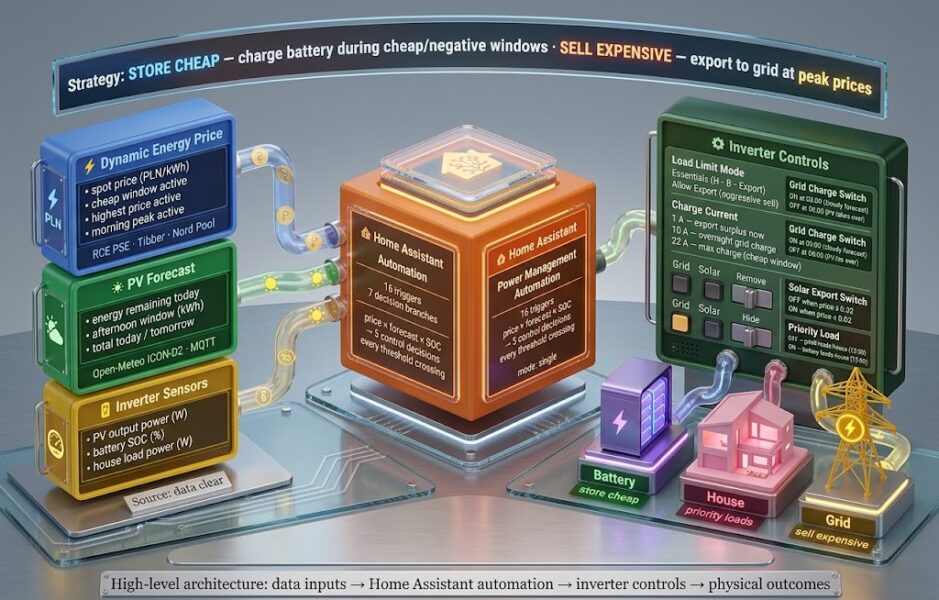
Most hybrid solar inverters ship with a simple charge-discharge loop: solar fills the battery, the battery runs the house, leftover generation goes to the grid. That works well on a flat tariff. On a dynamic spot-price tariff it consistently leaves money on the table — you might be draining your battery to zero at 11:00 while a high-price window opens at 15:00, or exporting at two cents per kWh while negative prices make it cheaper to charge from the grid than to generate.
The automation below runs on a Sunsynk hybrid inverter and pulls three data streams into Home Assistant: real-time spot prices from the Polish balancing market (RCE PSE), a physics-based PV production forecast, and the battery state of charge. The guiding strategy is store cheap, sell expensive — buy and store energy during cheap or negative-price windows; export and sell during expensive ones. From those three inputs the automation controls load limits, grid charging, export, and charge current — every time a price or forecast value crosses a decision threshold. If you are not on the Polish market, the price integration swaps out for Octopus Agile, Tibber, Nord Pool, or ENTSO-e; everything else stays the same.
What the Automation Manages
The overarching logic is store cheap, sell expensive. Five independent control decisions implement it:
- Battery charge rate — throttled to 1 A on a sunny forecast day with positive spot prices, so solar surplus routes to grid export (selling now) while the battery stays below full, preserving headroom for the next cheap-window charge; opened to full 22 A when prices are negative or at the cheapest window (charge as fast as possible); set to 10 A for overnight grid charging when tomorrow’s forecast is weak.
- Grid charging — enabled at 03:00 on nights before a poor-solar day, disabled at 06:00 to hand control back to PV.
- Solar export switch — turned off when spot price is near or below zero (no point selling at near-zero prices while paying to charge), turned back on when it rises above the threshold.
- Load limit mode (“Essentials” vs “Allow Export”) — in Essentials mode the inverter follows its supply priority: house loads first, battery charging second, grid export of any remaining surplus third; in Allow Export mode the inverter feeds the grid more aggressively, including from the battery. The automation switches between them based on battery SOC, price window, and tomorrow’s generation forecast.
- Priority load switch — shifts weekday consumption between battery-backed and grid-fed depending on whether cheap generation is available at 13:00.
Required Integrations
Solar Inverter — Sunsynk
The ss_ entity prefix belongs to the Sunsynk Home Assistant integration, available through HACS. After installation and configuration it exposes the controls used here:
sensor.ss_pv_power— DC power from panels (W)sensor.ss_battery_1_bms_soc— battery state of charge (%)sensor.ss_load_power— current house load (W)select.ss_load_limit— options:Essentials/Allow Exportselect.ss_prog1_charge— options:Allow Grid/No Grid or Genswitch.ss_grid_charge_enabledswitch.ss_solar_exportswitch.ss_priority_loadnumber.ss_battery_max_charge_current
If your inverter is a different brand, map these to their equivalents. The logic does not depend on Sunsynk specifically — it depends on having writable controls for charge current, grid charge, and export mode.
PV Production Forecast
The sensor.pv_forecast_* entities come from a custom Python script that pulls 15-minute irradiance data from the Open-Meteo DWD ICON-D2 model and publishes forecast sensors via MQTT Discovery. The full setup is covered in the Solar Panels Production Forecast article. The sensors used here are:
sensor.pv_forecast_energy_remaining_today— expected kWh from now until sunsetsensor.pv_forecast_energy_today— total forecast for todaysensor.pv_forecast_energy_tomorrow— total forecast for tomorrowsensor.pv_forecast_afternoon_solar_forecast— expected kWh in the afternoon window (default 12:00–16:00)
Dynamic Energy Price — RCE PSE and Country Equivalents
The automation reads three entities from the RCE PSE integration (Lewa-Reka/ha-rce-pse on HACS), which tracks the Polish balancing market price published by PSE S.A. at 15-minute granularity:
sensor.rce_pse_price— current spot price in PLN/kWhbinary_sensor.rce_pse_cheap_window_active—onduring the cheapest hours of the daybinary_sensor.rce_pse_highest_price_active—onduring the single peak price windowbinary_sensor.rce_pse_second_expensive_window_active—onduring the morning secondary peak
For other markets, substitute the RCE PSE entities for your local equivalent. The binary sensors for cheap/expensive windows are the most useful abstraction — if your integration does not provide them directly, create template binary sensors based on price thresholds. Common alternatives by country:
- UK — Octopus Energy (HACS) — provides current rate and Agile slot sensors natively
- Germany / Austria / Norway / Sweden — Tibber (built-in HA) or the advanced hass.tibber_prices HACS integration with 100+ sensors including best/peak period detection
- Scandinavia / Baltics — Nord Pool (built-in HA integration, region-selectable across NO1-NO5, SE1-SE4, DK1-DK2, FI, EE, LT, LV)
- Spain — PVPC (built-in HA integration) pulling REE esios hourly prices
- Netherlands / Belgium — easyEnergy (built-in HA) or Frank Energie / EnergyZero via energy-api-integrations (HACS)
- Australia — Amber Electric (built-in HA)
- Most of the EU — ENTSO-e Transparency Platform (HACS) — covers day-ahead prices for all EU bidding zones including CZ, HU, SK, RO, HR, SI, AT, FR, IT, and more
PV Startup
Set Essentials mode and throttle charging on a good forecast day
When sensor.ss_pv_power rises above 100 W, the inverter is put into Essentials mode, which sets its supply priority to house loads first, battery charging second, and grid export of any remaining surplus third. Export is therefore active from the start of the PV day — any solar production beyond house consumption goes to the grid. The automation then checks whether to throttle the charge current: if more than 15 kWh is expected between now and sunset, the afternoon window looks clear (above 14.1 kWh), the cheap grid window is not currently active, and the spot price is positive, charge current drops to just 1 A. At 1 A the battery absorbs almost nothing — solar surplus routes straight to grid export, selling at the current positive price, while the battery stays well below full. That preserved headroom is the point: when the next cheap-price window opens, the battery can accept a full charge at near-zero cost rather than arriving at it already full from solar. Throttling to 1 A is not about building SOC from solar — it is about keeping SOC low enough to buy cheap energy later, while selling current solar production now.
  - trigger: numeric_state
    entity_id: sensor.ss_pv_power
    above: 100
    id: PV started producing

actions:
  - choose:
      - conditions:
          - condition: trigger
            id: PV started producing
        sequence:
          - action: select.select_option
            data:
              option: Essentials
            target:
              entity_id: select.ss_load_limit
          - if:
              - condition: numeric_state
                entity_id: sensor.pv_forecast_energy_remaining_today
                above: 15
              - condition: numeric_state
                entity_id: sensor.pv_forecast_afternoon_solar_forecast
                above: 14.1
              - condition: state
                entity_id: binary_sensor.rce_pse_cheap_window_active
                state: 'off'
              - condition: numeric_state
                entity_id: sensor.rce_pse_price
                above: 0
            then:
              - action: number.set_value
                target:
                  entity_id: number.ss_battery_max_charge_current
                data:
                  value: '1'
Overnight Grid Charging
Charge from the grid at 03:00 if tomorrow's forecast is weak; stop at 06:00
At 03:00 the automation checks sensor.pv_forecast_energy_today. If tomorrow’s total generation is forecast below 8 kWh — a cloudy or short winter day — it enables grid charging at 10 A and sets ss_prog1_charge to Allow Grid. Night tariffs on dynamic markets are cheapest between 01:00 and 06:00, so this is when buying from the grid costs least.
At 06:00 the companion branch fires. If grid charging is still active it turns it off, resets charge current to 22 A for full solar acceptance, and sets ss_prog1_charge back to No Grid or Gen. The 06:00 stop is unconditional — whatever was charged overnight is enough; solar takes over from here.
triggers:
  - trigger: time
    at: '03:00:00'
    id: Night charge start
  - trigger: time
    at: '06:00:00'
    id: Night charge stop

actions:
  - choose:
      # 03:00 — start charging if tomorrow's forecast is weak
      - conditions:
          - condition: trigger
            id: Night charge start
          - condition: numeric_state
            entity_id: sensor.pv_forecast_energy_today
            below: 8
        sequence:
          - action: number.set_value
            target:
              entity_id: number.ss_battery_max_charge_current
            data:
              value: '10'
          - action: switch.turn_on
            target:
              entity_id: switch.ss_grid_charge_enabled
          - action: select.select_option
            target:
              entity_id: select.ss_prog1_charge
            data:
              option: Allow Grid
      # 06:00 — stop charging if grid charge is still active
      - conditions:
          - condition: trigger
            id: Night charge stop
          - condition: state
            entity_id: switch.ss_grid_charge_enabled
            state: 'on'
        sequence:
          - action: switch.turn_off
            target:
              entity_id: switch.ss_grid_charge_enabled
          - action: number.set_value
            target:
              entity_id: number.ss_battery_max_charge_current
            data:
              value: '22'
          - action: select.select_option
            target:
              entity_id: select.ss_prog1_charge
            data:
              option: No Grid or Gen
Cheap and Negative Price Windows
Charge at maximum current; stop exporting when prices are near zero
Two triggers share one action branch: binary_sensor.rce_pse_cheap_window_active going on, and sensor.rce_pse_price dropping below 0.02. Either condition fires the same response — battery charge current goes to 22 A. Charge as fast as possible while energy is cheap.
There is a nested check inside that branch: if the price is also below 0.02 and solar export is currently active, export gets turned off. Sending power to the grid for near-zero or negative revenue while simultaneously paying to top up the battery makes no sense — the automation stops it automatically.
triggers:
  - trigger: state
    entity_id: binary_sensor.rce_pse_cheap_window_active
    to: 'on'
    id: Cheapest Window is Active
  - trigger: numeric_state
    entity_id: sensor.rce_pse_price
    below: 0.02
    id: Negative price

actions:
  - choose:
      - conditions:
          - condition: trigger
            id:
              - Cheapest Window is Active
              - Negative price
        sequence:
          - action: number.set_value
            target:
              entity_id: number.ss_battery_max_charge_current
            data:
              value: '22'
          - if:
              - condition: numeric_state
                entity_id: sensor.rce_pse_price
                below: 0.02
              - condition: state
                entity_id: switch.ss_solar_export
                state: 'on'
            then:
              - action: switch.turn_off
                target:
                  entity_id: switch.ss_solar_export
Price Recovery — Resume Export
Re-enable solar export when the price rises back above the floor
When either the cheap window ends or the price crosses back above 0.02, and solar export is currently off, export is re-enabled. The double condition — both the trigger ID and the live price check — prevents this branch from firing if you happen to exit a cheap window while the price is still below the floor. Both the window state and the actual price must agree before the export switch goes back on.
triggers:
  - trigger: numeric_state
    entity_id: sensor.rce_pse_price
    above: 0.02
    id: Positive price
  - trigger: state
    entity_id: binary_sensor.rce_pse_cheap_window_active
    to: 'off'
    id: Cheapest Window is insctive

actions:
  - choose:
      - conditions:
          - condition: or
            conditions:
              - condition: trigger
                id: Positive price
              - condition: trigger
                id: Cheapest Window is insctive
          - condition: numeric_state
            entity_id: sensor.rce_pse_price
            above: 0.02
          - condition: state
            entity_id: switch.ss_solar_export
            state: 'off'
        sequence:
          - action: switch.turn_on
            target:
              entity_id: switch.ss_solar_export
Weekday Load Shifting
Move house loads to the grid at 13:00 if the afternoon looks lean; restore at 15:00
On weekdays at 13:00 the automation evaluates whether to shift the house off battery power. Three conditions must all be true: remaining solar forecast is below 11 kWh, battery SOC is below 40 %, and current PV output is below 2 kW. Together these signal a lean afternoon — cloud cover, shading, or seasonal low sun. switch.ss_priority_load is turned off, telling the inverter to feed loads from the grid rather than draw down the battery. The house runs on cheap midday grid power while the battery is preserved for the evening peak.
At 15:00 — as electricity moves toward the evening expensive window — priority load is turned back on. If it was already on because the 13:00 branch did not fire (a good solar day), the state: 'off' condition prevents the action from firing redundantly.
triggers:
  - trigger: time
    at: '13:00:00'
    weekday: [mon, tue, wed, thu, fri]
    id: Cheap_consumption_window
  - trigger: time
    at: '15:00:00'
    weekday: [mon, tue, wed, thu, fri]
    id: Expence_consumption_window

actions:
  - choose:
      # 13:00 — shift loads to grid if afternoon looks lean
      - conditions:
          - condition: trigger
            id: Cheap_consumption_window
          - condition: numeric_state
            entity_id: sensor.pv_forecast_energy_remaining_today
            below: 11
          - condition: numeric_state
            entity_id: sensor.ss_battery_1_bms_soc
            below: 40
          - condition: numeric_state
            entity_id: sensor.ss_pv_power
            below: 2000
        sequence:
          - action: switch.turn_off
            target:
              entity_id: switch.ss_priority_load
      # 15:00 — restore priority load heading into the evening peak
      - conditions:
          - condition: trigger
            id: Expence_consumption_window
          - condition: state
            entity_id: switch.ss_priority_load
            state: 'off'
        sequence:
          - action: switch.turn_on
            target:
              entity_id: switch.ss_priority_load
Evening Peak Export
Allow export when the highest-price window opens; revert when it closes or SOC drops
When binary_sensor.rce_pse_highest_price_active turns on, the automation checks three conditions before allowing export: battery must be above 85 %, current house load must be below 1 kW, and tomorrow’s forecast must exceed 20 kWh. That third condition is the key safety valve — there is no point selling today’s stored energy if tomorrow looks cloudy and you will need to buy it back at a premium. If all three pass, select.ss_load_limit switches to Allow Export and the inverter starts pushing to the grid at peak price.
Two triggers can revert the inverter back to Essentials: the high-price window ending (Highest price OFF), or the battery dropping below 75 % during active export (Battery not enough to sell). Either fires the same short sequence unconditionally — no extra conditions needed, because if either of those is true, the active peak-price export should stop. Reverting to Essentials does not disable all export; the inverter continues to push any solar surplus to the grid under the normal priority order — it simply stops prioritising grid feed-in over battery charging.
triggers:
  - trigger: state
    entity_id: binary_sensor.rce_pse_highest_price_active
    to: 'on'
    id: Highest price ON
  - trigger: state
    entity_id: binary_sensor.rce_pse_highest_price_active
    to: 'off'
    id: Highest price OFF
  - trigger: numeric_state
    entity_id: sensor.ss_battery_1_bms_soc
    below: 75
    id: Battery not enough to sell

actions:
  - choose:
      # Open export when the peak window starts and conditions are right
      - conditions:
          - condition: trigger
            id: Highest price ON
          - condition: numeric_state
            entity_id: sensor.ss_battery_1_bms_soc
            above: 85
          - condition: numeric_state
            entity_id: sensor.ss_load_power
            below: 1000
          - condition: numeric_state
            entity_id: sensor.pv_forecast_energy_tomorrow
            above: 20
        sequence:
          - action: select.select_option
            target:
              entity_id: select.ss_load_limit
            data:
              option: Allow Export
      # Revert when the window ends or SOC drops below the sell threshold
      - conditions:
          - condition: or
            conditions:
              - condition: trigger
                id: Highest price OFF
              - condition: trigger
                id: Battery not enough to sell
        sequence:
          - action: select.select_option
            target:
              entity_id: select.ss_load_limit
            data:
              option: Essentials
Morning High Price Window
A second export opportunity in the morning; tighter conditions protect daytime generation
The Polish RCE market often carries a secondary morning price peak between 07:00 and 10:00, tracked by binary_sensor.rce_pse_second_expensive_window_active. The automation opens export during this window too, but with tighter conditions than the evening peak: SOC must be above 25 % (lower floor, since you have the whole day ahead to refill), house load must be below 1 kW, and remaining-day forecast must exceed 17 kWh. That last threshold is what makes the morning sell safe — you need confidence that the afternoon will refill the battery before committing to export early in the day.
When the morning window closes, or if the battery drops below 20 % at any point while export is active, the ss_load_limit is pulled back to Essentials — ending the active grid feed-in while still allowing any solar surplus to export naturally under the Essentials priority order. The state: Allow Export guard on the reversion branch prevents it from firing on days where the morning window opened but conditions were not met and export never started.
triggers:
  - trigger: state
    entity_id: binary_sensor.rce_pse_second_expensive_window_active
    to: 'on'
    id: Morning High Price ON
  - trigger: state
    entity_id: binary_sensor.rce_pse_second_expensive_window_active
    to: 'off'
    id: Morning High Price OFF
  - trigger: numeric_state
    entity_id: sensor.ss_battery_1_bms_soc
    below: 20
    id: Battery below 20%

actions:
  - choose:
      # Open export during the morning secondary peak
      - conditions:
          - condition: trigger
            id: Morning High Price ON
          - condition: numeric_state
            entity_id: sensor.ss_battery_1_bms_soc
            above: 25
          - condition: numeric_state
            entity_id: sensor.ss_load_power
            below: 1000
          - condition: numeric_state
            entity_id: sensor.pv_forecast_energy_remaining_today
            above: 17
        sequence:
          - action: select.select_option
            target:
              entity_id: select.ss_load_limit
            data:
              option: Allow Export
      # Revert when the window closes or battery is critically low
      - conditions:
          - condition: or
            conditions:
              - condition: trigger
                id: Battery below 20%
              - condition: trigger
                id: Morning High Price OFF
          - condition: state
            entity_id: select.ss_load_limit
            state: Allow Export
        sequence:
          - action: select.select_option
            target:
              entity_id: select.ss_load_limit
            data:
              option: Essentials
The Full Automation
alias: Power management
description: ''
triggers:
  - trigger: numeric_state
    entity_id: sensor.ss_pv_power
    above: 100
    id: PV started producing
  - trigger: time
    at: '03:00:00'
    id: Night charge start
  - trigger: time
    at: '06:00:00'
    id: Night charge stop
  - trigger: state
    entity_id: binary_sensor.rce_pse_cheap_window_active
    to: 'on'
    id: Cheapest Window is Active
  - trigger: state
    entity_id: binary_sensor.rce_pse_cheap_window_active
    to: 'off'
    id: Cheapest Window is insctive
  - trigger: numeric_state
    entity_id: sensor.rce_pse_price
    id: Negative price
    below: 0.02
  - trigger: numeric_state
    entity_id: sensor.rce_pse_price
    id: Positive price
    above: 0.02
  - trigger: numeric_state
    entity_id: sensor.pv_forecast_afternoon_solar_forecast
    id: Cloudy risk
    below: 14
  - trigger: time
    at: '13:00:00'
    weekday: [mon, tue, wed, thu, fri]
    id: Cheap_consumption_window
  - trigger: time
    at: '15:00:00'
    weekday: [mon, tue, wed, thu, fri]
    id: Expence_consumption_window
  - trigger: numeric_state
    entity_id: sensor.ss_battery_1_bms_soc
    below: 20
    id: Battery below 20%
  - trigger: state
    entity_id: binary_sensor.rce_pse_highest_price_active
    to: 'on'
    id: Highest price ON
  - trigger: state
    entity_id: binary_sensor.rce_pse_highest_price_active
    to: 'off'
    id: Highest price OFF
  - trigger: numeric_state
    entity_id: sensor.ss_battery_1_bms_soc
    below: 75
    id: Battery not enough to sell
  - trigger: state
    entity_id: binary_sensor.rce_pse_second_expensive_window_active
    to: 'on'
    id: Morning High Price ON
  - trigger: state
    entity_id: binary_sensor.rce_pse_second_expensive_window_active
    to: 'off'
    id: Morning High Price OFF
conditions: []
actions:
  - choose:
      - conditions:
          - condition: trigger
            id: PV started producing
        sequence:
          - action: select.select_option
            data:
              option: Essentials
            target:
              entity_id: select.ss_load_limit
          - if:
              - condition: numeric_state
                entity_id: sensor.pv_forecast_energy_remaining_today
                above: 15
              - condition: numeric_state
                entity_id: sensor.pv_forecast_afternoon_solar_forecast
                above: 14.1
              - condition: state
                entity_id: binary_sensor.rce_pse_cheap_window_active
                state: 'off'
              - condition: numeric_state
                entity_id: sensor.rce_pse_price
                above: 0
            then:
              - action: number.set_value
                target:
                  entity_id: number.ss_battery_max_charge_current
                data:
                  value: '1'
      - conditions:
          - condition: trigger
            id: Night charge stop
          - condition: state
            entity_id: switch.ss_grid_charge_enabled
            state: 'on'
        sequence:
          - action: switch.turn_off
            target:
              entity_id: switch.ss_grid_charge_enabled
          - action: number.set_value
            target:
              entity_id: number.ss_battery_max_charge_current
            data:
              value: '22'
          - action: select.select_option
            target:
              entity_id: select.ss_prog1_charge
            data:
              option: No Grid or Gen
      - conditions:
          - condition: trigger
            id: Night charge start
          - condition: numeric_state
            entity_id: sensor.pv_forecast_energy_today
            below: 8
        sequence:
          - action: number.set_value
            target:
              entity_id: number.ss_battery_max_charge_current
            data:
              value: '10'
          - action: switch.turn_on
            target:
              entity_id: switch.ss_grid_charge_enabled
          - action: select.select_option
            target:
              entity_id: select.ss_prog1_charge
            data:
              option: Allow Grid
      - conditions:
          - condition: trigger
            id:
              - Cheapest Window is Active
              - Negative price
        sequence:
          - action: number.set_value
            target:
              entity_id: number.ss_battery_max_charge_current
            data:
              value: '22'
          - if:
              - condition: numeric_state
                entity_id: sensor.rce_pse_price
                below: 0.02
              - condition: state
                entity_id: switch.ss_solar_export
                state: 'on'
            then:
              - action: switch.turn_off
                target:
                  entity_id: switch.ss_solar_export
      - conditions:
          - condition: or
            conditions:
              - condition: trigger
                id: Positive price
              - condition: trigger
                id: Cheapest Window is insctive
          - condition: numeric_state
            entity_id: sensor.rce_pse_price
            above: 0.02
          - condition: state
            entity_id: switch.ss_solar_export
            state: 'off'
        sequence:
          - action: switch.turn_on
            target:
              entity_id: switch.ss_solar_export
      - conditions:
          - condition: trigger
            id: Cheap_consumption_window
          - condition: numeric_state
            entity_id: sensor.pv_forecast_energy_remaining_today
            below: 11
          - condition: numeric_state
            entity_id: sensor.ss_battery_1_bms_soc
            below: 40
          - condition: numeric_state
            entity_id: sensor.ss_pv_power
            below: 2000
        sequence:
          - action: switch.turn_off
            target:
              entity_id: switch.ss_priority_load
      - conditions:
          - condition: trigger
            id: Expence_consumption_window
          - condition: state
            entity_id: switch.ss_priority_load
            state: 'off'
        sequence:
          - action: switch.turn_on
            target:
              entity_id: switch.ss_priority_load
      - conditions:
          - condition: or
            conditions:
              - condition: trigger
                id: Battery below 20%
              - condition: trigger
                id: Morning High Price OFF
          - condition: state
            entity_id: select.ss_load_limit
            state: Allow Export
        sequence:
          - action: select.select_option
            target:
              entity_id: select.ss_load_limit
            data:
              option: Essentials
      - conditions:
          - condition: trigger
            id: Highest price ON
          - condition: numeric_state
            entity_id: sensor.ss_battery_1_bms_soc
            above: 85
          - condition: numeric_state
            entity_id: sensor.ss_load_power
            below: 1000
          - condition: numeric_state
            entity_id: sensor.pv_forecast_energy_tomorrow
            above: 20
        sequence:
          - action: select.select_option
            target:
              entity_id: select.ss_load_limit
            data:
              option: Allow Export
      - conditions:
          - condition: or
            conditions:
              - condition: trigger
                id: Highest price OFF
              - condition: trigger
                id: Battery not enough to sell
        sequence:
          - action: select.select_option
            target:
              entity_id: select.ss_load_limit
            data:
              option: Essentials
      - conditions:
          - condition: trigger
            id: Morning High Price ON
          - condition: numeric_state
            entity_id: sensor.ss_battery_1_bms_soc
            above: 25
          - condition: numeric_state
            entity_id: sensor.ss_load_power
            below: 1000
          - condition: numeric_state
            entity_id: sensor.pv_forecast_energy_remaining_today
            above: 17
        sequence:
          - action: select.select_option
            target:
              entity_id: select.ss_load_limit
            data:
              option: Allow Export
mode: queued
max: 10
Adding the Automation to Home Assistant
You have two routes for loading the automation. The UI editor is the quickest for a first install. The YAML file method is better if you version-control your configuration or manage multiple HA instances.
Method 1 — Automations Editor (UI)
- Go to Settings → Automations & Scenes and click Create Automation.
- On the new automation screen, click the three-dot menu in the top-right corner and choose Edit as YAML.
- Select all the placeholder text in the editor and paste the full automation YAML from the section above — everything from
alias: Power managementdown to and includingmax: 10. - Click Save. Home Assistant will validate the YAML and create the automation immediately.
Method 2 — Direct YAML File
If your HA configuration uses a split automations.yaml file (the default for most installations), open it from your config directory and append the full YAML block. The file path on a standard Home Assistant OS install is /config/automations.yaml; on a Docker or supervised install it is wherever you mounted the config volume.
- Open
config/automations.yamlin a text editor (File editor add-on, SSH, or Samba share). - Paste the automation YAML at the end of the file. Each automation in the list starts with a
- alias:block at the root indentation level — make sure the new entry follows the same pattern. - Save the file.
- Reload automations without restarting HA: go to Developer Tools → YAML → Reload Automations. Alternatively, run this in a terminal or SSH session:
ha automation reloadVerifying the Automation Loaded
Go to Settings → Automations & Scenes and look for Power management in the list. If it appears, the automation is active. If it is missing, open Settings → System → Logs and look for a YAML parse error — a misplaced indent or stray tab character is the usual cause.
A Note on mode: queued
mode: queued means if a new trigger fires while the automation is already running, the new run is queued rather than dropped, and executes as soon as the current run finishes. max: 10 caps how many runs can wait in the queue at once — triggers beyond that limit are discarded.
This matters for this particular automation because price sensors and forecast sensors can update within seconds of each other. A spot price crossing a threshold and a PV forecast update can arrive almost simultaneously — two separate trigger events within a few seconds. With mode: single, the second trigger is silently dropped: the automation is still executing the first run, so the incoming trigger is discarded and whatever condition it would have evaluated never runs. With mode: queued, both runs execute in order. No threshold crossing is missed.
In normal daytime operation the queue rarely exceeds two or three runs. The max: 10 cap is a safety ceiling for edge cases — rapid sensor bursts during a HA restart or after a WiFi reconnect — not a target. If you see the queue filling regularly, that is a signal the sensors themselves are publishing too frequently rather than a problem with the automation.
Checking the First Run with Traces
After the automation is live, wait for the first trigger to fire — a price threshold crossing or a time-based event — then open Settings → Automations & Scenes, find Power management, click the three-dot menu on the card, and choose Traces. Each trace shows exactly which choose branch matched, which conditions passed or failed, and which actions ran, with timestamps. Check the first few traces to confirm the right branch executed for the conditions at that moment. This is the fastest way to catch a logic mismatch without touching the YAML.
Adapting to Your Setup
Swap the price integration. Replace every sensor.rce_pse_price, binary_sensor.rce_pse_cheap_window_active, binary_sensor.rce_pse_highest_price_active, and binary_sensor.rce_pse_second_expensive_window_active with the equivalent sensors from your country’s integration. If your integration only provides a raw price sensor (no pre-computed cheap/expensive binary sensors), create template binary sensors. For example, with Tibber or ENTSO-e you might define a cheap window as the cheapest 6 hours in the next 24, which some integrations calculate for you automatically.
Adjust the SOC thresholds. The 85 %/75 %/40 %/25 %/20 % values are tuned for a specific battery capacity and household load. If your battery is smaller, the protection floor at 20 % may need to be higher. If you have a larger battery and lower consumption, you can allow export starting from a lower SOC.
Adjust the forecast thresholds. The 15 kWh / 11 kWh / 17 kWh / 20 kWh / 8 kWh values depend on your panel capacity and local irradiance. Start by logging a few weeks of your actual sensor.pv_forecast_energy_today readings against actual generation and calibrate from there.
Inverter entity mapping. If you are using a Deye, Solis, Growatt, or Huawei inverter, find the equivalent entities for load limit mode, battery charge current, grid charge switch, and export switch in that integration’s documentation. The logic structure stays identical.
What You Now Have
A single Home Assistant automation, triggered by 16 state changes and time events, replaces a full energy management controller. It implements one guiding principle — store energy during cheap and negative-price windows, sell it back during expensive ones — through five independent controls: charge rate, grid charging, export switch, load limit mode, and priority load. Every decision is driven by live price and forecast data rather than a fixed schedule.
Natural follow-ups from here: building a Lovelace dashboard that surfaces all the price and forecast sensors in one view so you can see at a glance why the automation made its last move, and adding an EV charger to the same logic so the car charges only during cheap or negative-price windows.
G Meta Keywords: home assistant, solar automation, photovoltaic, hybrid inverter, sunsynk, pv forecast, dynamic energy price, rce pse, battery management, grid charging, energy export, spot price, octopus energy, tibber, nord pool, pvpc, entso-e, amber electric