If you have a solar installation, you quickly start wanting to know not just what the panels produced today but what they are likely to produce in the next few hours. Home Assistant actually ships with two built-in paths for this — and both hit a wall in ways that matter for real home automation use.
The first is the Forecast.Solar integration, which comes built into HA with no extra installation. It works out of the box on the free tier, but the free tier updates only once per hour, restricts you to a single array plane, and covers only locations within the EU PVGIS database. More importantly, it is built on historical irradiance averages combined with weather data — not on an actual numerical weather prediction model. The forecast shape it gives you is statistically plausible, not drawn from today’s synoptic situation. Upgrading to an API key unlocks 30-minute updates and multi-plane support, but that is a paid subscription.
The second option is Solcast, available through HACS. Solcast is genuinely excellent — it uses satellite imagery and NWP data and exposes 15+ sensors including confidence percentiles. The problem is the access model. You need to register a Solcast account, configure your rooftop sites in their web dashboard, and live within the free tier’s API call budget: new accounts get 10 calls per day, legacy hobbyist accounts get 50. Ten calls per day works out to one update every 2.4 hours. That is not fast enough for anything time-sensitive like battery dispatch decisions.
This guide takes a different route. A single Python script pulls 15-minute irradiance and temperature data directly from the Open-Meteo DWD ICON-D2 numerical weather model — no account, no API key, no web dashboard, no call budget. It runs as a systemd service on any Linux box, uses the actual NWP forecast for today’s atmospheric conditions, and surfaces eight sensors in Home Assistant via MQTT Discovery every 15 minutes by default. The whole thing is self-contained and runs entirely on your own infrastructure.
The practical payoff goes beyond curiosity. If your installation includes a battery and your energy tariff has time-of-use pricing, a 15-minute-resolution forecast lets you run real automations: charge the battery from the grid overnight when rates are low, let solar fill it in the morning, and then — if the afternoon forecast shows enough generation — export surplus to the grid during the peak-price window rather than wasting storage capacity holding energy you will produce anyway. Without a forward-looking forecast these decisions fall back to heuristics; with one they become data-driven and measurable.
The script is written around a Deye SUN-10K inverter, which belongs to the same hardware family as the popular Sunsynk range. If you have not yet connected your Deye or Sunsynk inverter to Home Assistant, this guide covers the full integration and dashboard setup.
How it works
The data source — Open-Meteo ICON-D2
Open-Meteo is a free, open-source weather API that requires no registration or API key for non-commercial use. Personal home automation falls squarely within the allowed use case. The script uses the DWD ICON-D2 model specifically because it provides the global_tilted_irradiance variable — irradiance already projected onto your panel’s physical plane — rather than forcing you to do the tilt-and-azimuth conversion yourself. ICON-D2 runs at 2 km horizontal resolution and covers a roughly 48-hour horizon, which is exactly what the script requests (forecast_days=2).
There is one coordinate system mismatch worth knowing about upfront. The .env file stores azimuth as a compass bearing, where 0 is North and 180 is South — the convention most people are used to. Open-Meteo uses the opposite: 0 is South, 90 is West. The script converts automatically (azimuth_api = AZIMUTH − 180) so you never need to think about it, but if you are ever debugging unexpected output this is the first thing to check.
The physics model
The power estimate is a deliberately simple PVWatts-style model. It is not trying to out-precision a full scientific simulation — it is trying to give you a number that tracks the forecast shape well enough to make useful home automation decisions. The chain is: take the plane-of-array irradiance, estimate cell temperature using a NOCT model, apply a linear temperature derating to the array’s STC power, multiply by a flat inverter efficiency, and clip the result at the inverter’s AC limit. That is four steps, no lookup tables, no spectral correction, no shading model — exactly as much as you need.
The defaults in the script match an 11 × Longi LR5-66HTH-535M array (5 885 Wp) with a Deye SUN-10K inverter. All hardware constants are configurable via .env — see the Configuration section below.
MQTT Discovery
Instead of requiring any manual entity configuration in Home Assistant, the script uses MQTT Discovery. On every connection to the broker it publishes a JSON config payload to homeassistant/sensor/{device_id}/{key}/config for each of its eight sensors. Home Assistant reads those payloads and automatically creates the entities under a single device card. If you rename the device later, use the included remove_entities.sh script to clear the old retained config topics before restarting with the new name — otherwise both sets of entities linger.
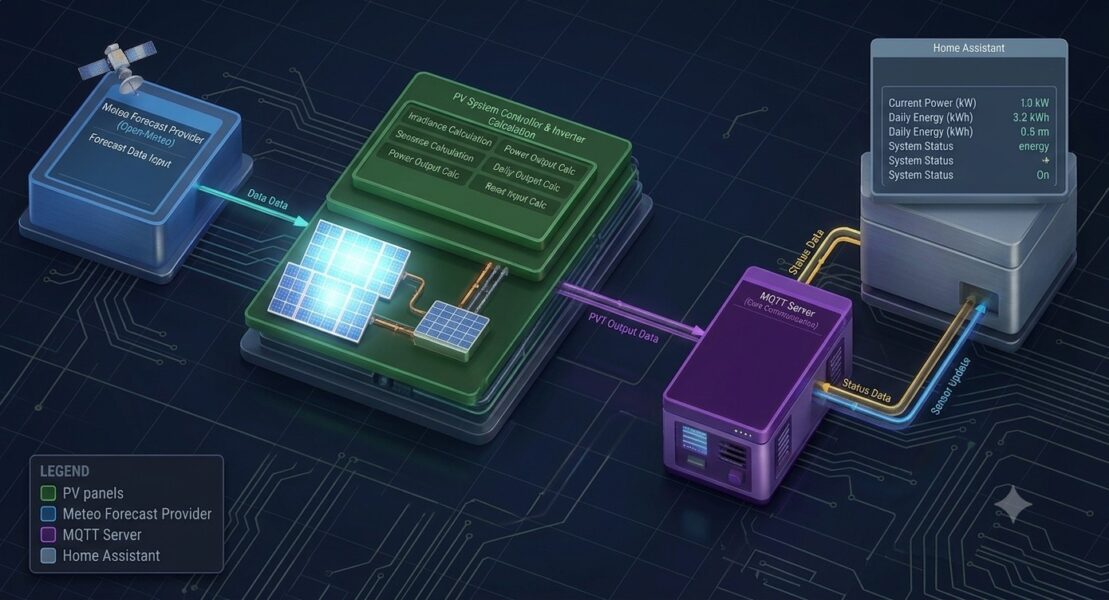
Architecture Diagram
The system has four components connected left to right:
Open-Meteo API — the only external dependency. The script calls it over HTTPS every 15 minutes, requesting global_tilted_irradiance and temperature_2m at 15-minute resolution for the next 48 hours. No key, no account.
irradiance_forecast.py — the Python service (systemd-managed, runs in a venv under /opt). Internally it chains four steps:
- Config loading — reads
.envor systemdEnvironmentFile=, real env vars always win - fetch_forecast() — fires the HTTP GET, converts azimuth convention (compass → Open-Meteo)
- Physics model — per slot: NOCT cell temp → DC power with temp derating → × inverter efficiency → clipped at AC limit (10 kW)
- build_state_payload() — aggregates the per-slot AC values into the 8 sensor numbers, then make_client() / publish_discovery() pushes them to the broker
MQTT Broker — holds three retained topics: the JSON state payload, an availability (LWT) topic, and 8 discovery config topics under homeassistant/sensor/…
Home Assistant — subscribes to those topics. The 8 discovery configs auto-create one device card with 8 sensors; no YAML needed. State updates arrive as a single JSON blob, each sensor extracts its field via value_template.
Data flows strictly left to right: Open-Meteo → Python service → MQTT → HA. Nothing flows back.
The eight sensors
Once running, the service publishes the following sensors every 15 minutes (configurable via UPDATE_INTERVAL):
- Power — current estimated AC output in Watts
- Energy Remaining This Hour — kWh forecast for the rest of the current clock hour
- Energy Today — full-day forecast total in kWh (not elapsed — the same semantics as Energy Tomorrow)
- Energy Remaining Today — kWh from the current 15-minute slot to end of day
- Energy Next Hour — kWh forecast for the next complete clock hour
- Energy Tomorrow — full next-day forecast in kWh
- POA Irradiance — raw plane-of-array irradiance in W/m² for the current slot
- Afternoon Solar Forecast — kWh total for a configurable afternoon window (default 12:00–16:00), useful as a sell-vs-store battery decision signal
What you will need
- A Linux host with Python 3.9 or later (the script uses
zoneinfo, which requires 3.9+) - An MQTT broker reachable from that host — Mosquitto running on the same machine or on your Home Assistant instance both work
- Home Assistant with the MQTT integration configured and connected to the same broker
mosquitto-clientsinstalled (only needed if you use theremove_entities.shcleanup script)- Your panel array’s latitude, longitude, tilt, and compass azimuth
The solution works as-is for most setups — deploy it, fill in the .env file, and the sensors appear in Home Assistant. That said, the hardware constants (panel count, rated power, temperature coefficient, inverter rating) are specific to your installation and need to be edited directly in the Python file. The most comfortable way to do this is with Claude Code running inside Home Assistant’s VS Code panel, where you can describe your hardware in plain English and let it make the changes for you. If you have not set that up yet, this guide walks through integrating VS Code and Claude Code into the HA UI.
The files
The project consists of six files. Copy each one to your working directory before running the deploy script.
irradiance_forecast.py
This is the main script. All configuration — including hardware constants — is driven by the .env file. No values need to be edited in the Python source before deploying.
#!/usr/bin/env python3
class="st">"""
irradiance_forecast.py — PV production forecast publisher

Pulls tilted-plane solar irradiance from Open-Meteo's DWD ICON-D2 model
(free, non-commercial tier — no key needed, personal home-automation use
is explicitly an allowed use case), converts it into an estimated AC
power / energy figure for THIS specific array + inverter, and publishes
it to Home Assistant via MQTT Discovery as one device with several
sensors.

Deploy at: /opt/irradiance_forecast/irradiance_forecast.py
Config:    /opt/irradiance_forecast/.env   (see .env.example)
Service:   /opt/irradiance_forecast/irradiance_forecast.service

Test the math/API call without touching MQTT at all:
    python3 irradiance_forecast.py --dry-run
class="st">"""

import argparse
import json
import logging
import os
import re
import signal
import sys
import time
from datetime import datetime, timedelta
from zoneinfo import ZoneInfo

import requests

# ============================================================
# 1) ENV CONFIG — loaded from .env next to this script
#    (also works fine if systemd's EnvironmentFile= sets these
#     directly — real env vars always win over the file below)
# ============================================================

SCRIPT_DIR = os.path.dirname(os.path.abspath(__file__))


def _strip_inline_comment(value):
    # Strip trailing inline comments (e.g. `160 #orientation`), but leave
    # quoted values alone so a literal "#" can still be used. Applied to
    # every value env() returns, not just the .env-file parse below,
    # because systemd's EnvironmentFile= only treats a line as a comment
    # when "#"/";" is its very FIRST character — it does NOT strip inline
    # comments — so a value set that way reaches os.environ unstripped and
    # would otherwise bypass this entirely (real env vars win over the
    # file parse in env() below).
    if value is None or value.startswith(class="st">'"') or value.startswith(class="st">"'"):
        return value
    return re.split(r"\s+#", value, maxsplit=1)[0].strip()


def load_dotenv(path):
    env = {}
    if os.path.exists(path):
        with open(path, encoding=class="st">"utf-8") as f:
            for line in f:
                line = line.strip()
                if not line or line.startswith("#") or "=" not in line:
                    continue
                key, _, value = line.partition(class="st">"=")
                env[key.strip()] = _strip_inline_comment(value.strip())
    return env


_FILE_ENV = load_dotenv(os.path.join(SCRIPT_DIR, class="st">".env"))


def env(key, default=None):
    # Real process environment (e.g. systemd EnvironmentFile=) wins;
    # falls back to the plain .env file parsed above; then a default.
    return _strip_inline_comment(os.environ.get(key, _FILE_ENV.get(key, default)))


MQTT_HOST       = env(class="st">"MQTT_HOST", class="st">"localhost")
MQTT_PORT       = int(env(class="st">"MQTT_PORT", class="st">"1883"))
MQTT_USER       = env(class="st">"MQTT_USER") or None
MQTT_PASSWORD   = env(class="st">"MQTT_PASSWORD") or None
HOSTNAME_LABEL  = env(class="st">"HOSTNAME_LABEL", class="st">"pv_forecast")
UPDATE_INTERVAL = int(env(class="st">"UPDATE_INTERVAL", class="st">"900"))

# ============================================================
# 2) SITE / HARDWARE CONFIG — edit these, they rarely change
# ============================================================

LATITUDE  = float(env(class="st">"LATITUDE",  class="st">"0"))
LONGITUDE = float(env(class="st">"LONGITUDE", class="st">"0"))


def get_local_tz():
    # Follow the host's configured timezone (/etc/localtime symlink).
    try:
        zone_name = os.path.realpath(class="st">"/etc/localtime").split(class="st">"zoneinfo/", 1)[1]
        return ZoneInfo(zone_name)
    except Exception:
        return ZoneInfo(class="st">"UTC")


LOCAL_TZ = get_local_tz()

# Tilt: 0 = flat/horizontal, 90 = vertical. Same convention everywhere.
PANEL_TILT_DEG = float(env(class="st">"PANEL_TILT_DEG", class="st">"35"))

# Azimuth as compass bearing: 0=North, 90=East, 180=South, 270=West.
# Conversion to Open-Meteo convention happens in fetch_forecast().
AZIMUTH = float(env(class="st">"AZIMUTH", class="st">"180"))

# Array + inverter
ARRAY_WP            = float(env(class="st">"ARRAY_WP",            class="st">"5885"))    # total STC peak power (W)
TEMP_COEFF_PMAX     = float(env(class="st">"TEMP_COEFF_PMAX",    class="st">"-0.0029"))  # Pmax temp coeff (%/°C as decimal)
NOCT_C              = float(env(class="st">"NOCT_C",              class="st">"45.0"))    # nominal operating cell temp (°C)
INVERTER_AC_LIMIT_W = float(env(class="st">"INVERTER_AC_LIMIT_W", class="st">"10000"))   # nominal AC rating (W)
INVERTER_EFFICIENCY = float(env(class="st">"INVERTER_EFFICIENCY",  class="st">"0.97"))   # flat DC→AC efficiency

OPEN_METEO_URL = class="st">"https://api.open-meteo.com/v1/dwd-icon"
FORECAST_DAYS  = 2

AFTERNOON_START_H = int(env(class="st">"AFTERNOON_START_H", class="st">"12"))
AFTERNOON_END_H   = int(env(class="st">"AFTERNOON_END_H",   class="st">"16"))

# ============================================================
# 3) MQTT / HA DISCOVERY TOPOLOGY
# ============================================================

DEVICE_SLUG = (
    class="st">"".join(c if c.isalnum() else class="st">"_" for c in HOSTNAME_LABEL.lower()).strip(class="st">"_")
    or class="st">"pv_forecast"
)
DEVICE_ID         = fclass="st">"pv_forecast_{DEVICE_SLUG}"
DISCOVERY_PREFIX  = class="st">"homeassistant"
STATE_TOPIC       = fclass="st">"pv_forecast/{DEVICE_SLUG}/state"
AVAILABILITY_TOPIC = fclass="st">"pv_forecast/{DEVICE_SLUG}/availability"

DEVICE_INFO = {
    class="st">"identifiers": [DEVICE_ID],
    class="st">"name":        HOSTNAME_LABEL,
    class="st">"manufacturer": class="st">"irradiance_forecast.py (Open-Meteo / DWD ICON-D2)",
    class="st">"model":       class="st">"11x Longi LR5-66HTH-535M / Deye SUN-10K-SG01HP3-EU-AM2",
}

SENSORS = [
    (class="st">"power",               class="st">"Power",                    class="st">"W",    class="st">"power",      class="st">"measurement", class="st">"power_w",                    class="st">"mdi:solar-power"),
    (class="st">"energy_hour",         class="st">"Energy Remaining This Hour",class="st">"kWh", class="st">"energy",     class="st">"measurement", class="st">"energy_hour_kwh",             class="st">"mdi:solar-power-variant"),
    (class="st">"energy_today",        class="st">"Energy Today",             class="st">"kWh",  class="st">"energy",     class="st">"measurement", class="st">"energy_today_kwh",            class="st">"mdi:solar-power-variant"),
    (class="st">"energy_today_remaining",class="st">"Energy Remaining Today", class="st">"kWh",  class="st">"energy",     class="st">"measurement", class="st">"energy_today_remaining_kwh",  class="st">"mdi:solar-power-variant"),
    (class="st">"energy_next_hour",    class="st">"Energy Next Hour",         class="st">"kWh",  class="st">"energy",     class="st">"measurement", class="st">"energy_next_hour_kwh",        class="st">"mdi:solar-power-variant"),
    (class="st">"energy_tomorrow",     class="st">"Energy Tomorrow",          class="st">"kWh",  class="st">"energy",     class="st">"measurement", class="st">"energy_tomorrow_kwh",         class="st">"mdi:solar-power-variant"),
    (class="st">"poa_irradiance",      class="st">"POA Irradiance",           class="st">"W/m²", class="st">"irradiance", class="st">"measurement", class="st">"poa_irradiance_wm2",          class="st">"mdi:weather-sunny"),
    (class="st">"afternoon_energy",    class="st">"Afternoon Solar Forecast", class="st">"kWh",  None,         class="st">"measurement", class="st">"afternoon_energy_kwh",        class="st">"mdi:weather-sunny-alert"),
]

log = logging.getLogger(class="st">"irradiance_forecast")


# ============================================================
# 4) FETCH + PHYSICS MODEL
# ============================================================

def fetch_forecast():
    params = {
        class="st">"latitude":    LATITUDE,
        class="st">"longitude":   LONGITUDE,
        class="st">"minutely_15": class="st">"global_tilted_irradiance,temperature_2m",
        class="st">"tilt":        PANEL_TILT_DEG,
        class="st">"azimuth":     AZIMUTH - 180,  # compass→Open-Meteo convention
        class="st">"forecast_days": FORECAST_DAYS,
        class="st">"timezone":    LOCAL_TZ.key,
    }
    resp = requests.get(OPEN_METEO_URL, params=params, timeout=20)
    resp.raise_for_status()
    return resp.json()


def estimate_ac_power_w(poa_irradiance_wm2, ambient_temp_c):
    class="st">"""PVWatts-style estimate: NOCT cell-temp model + linear temp derating,
    flat inverter efficiency, clipped at the inverter's AC rating.class="st">"""
    if poa_irradiance_wm2 is None or poa_irradiance_wm2 <= 0:
        return 0.0
    cell_temp_c = ambient_temp_c + (NOCT_C - 20.0) / 800.0 * poa_irradiance_wm2
    dc_power_w  = ARRAY_WP * (poa_irradiance_wm2 / 1000.0) * (
        1 + TEMP_COEFF_PMAX * (cell_temp_c - 25.0)
    )
    dc_power_w = max(0.0, dc_power_w)
    ac_power_w = dc_power_w * INVERTER_EFFICIENCY
    return min(ac_power_w, INVERTER_AC_LIMIT_W)


def build_state_payload(data, now=None):
    now   = now or datetime.now(LOCAL_TZ)
    times = data[class="st">"minutely_15"][class="st">"time"]
    poa   = data[class="st">"minutely_15"][class="st">"global_tilted_irradiance"]
    temp  = data[class="st">"minutely_15"][class="st">"temperature_2m"]

    ts = [datetime.fromisoformat(t).replace(tzinfo=LOCAL_TZ) for t in times]
    ac = [estimate_ac_power_w(g, t) for g, t in zip(poa, temp)]

    idx_now = 0
    for i, t in enumerate(ts):
        if t <= now:
            idx_now = i
        else:
            break

    hour_start    = now.replace(minute=0, second=0, microsecond=0)
    hour_end      = hour_start + timedelta(hours=1)
    next_hour_end = hour_end   + timedelta(hours=1)
    today         = now.date()
    tomorrow      = today + timedelta(days=1)

    # Anchor to current slot start — partially-elapsed slot counts as future.
    current_slot_ts = ts[idx_now]

    energy_hour_wh = sum(
        p * 0.25 for p, t in zip(ac, ts)
        if current_slot_ts <= t < hour_end
    )
    energy_today_wh = sum(                      # full-day total, NOT elapsed
        p * 0.25 for p, t in zip(ac, ts) if t.date() == today
    )
    energy_today_remaining_wh = sum(
        p * 0.25 for p, t in zip(ac, ts)
        if t.date() == today and t >= current_slot_ts
    )
    energy_next_hour_wh = sum(
        p * 0.25 for p, t in zip(ac, ts)
        if hour_end <= t < next_hour_end
    )
    energy_tomorrow_wh = sum(
        p * 0.25 for p, t in zip(ac, ts) if t.date() == tomorrow
    )
    afternoon_wh = sum(
        p * 0.25 for p, t in zip(ac, ts)
        if t.date() == today and AFTERNOON_START_H <= t.hour < AFTERNOON_END_H
    )

    return {
        class="st">"power_w":                    round(ac[idx_now]),
        class="st">"energy_hour_kwh":            round(energy_hour_wh            / 1000.0, 3),
        class="st">"energy_today_kwh":           round(energy_today_wh           / 1000.0, 3),
        class="st">"energy_today_remaining_kwh": round(energy_today_remaining_wh / 1000.0, 3),
        class="st">"energy_next_hour_kwh":       round(energy_next_hour_wh       / 1000.0, 3),
        class="st">"energy_tomorrow_kwh":        round(energy_tomorrow_wh        / 1000.0, 3),
        class="st">"poa_irradiance_wm2":         round(poa[idx_now]) if poa[idx_now] is not None else 0,
        class="st">"afternoon_energy_kwh":       round(afternoon_wh              / 1000.0, 3),
        class="st">"updated":                    now.isoformat(),
    }


# ============================================================
# 5) MQTT
# ============================================================

def publish_discovery(client):
    for key, name, unit, device_class, state_class, json_key, icon in SENSORS:
        config_topic = fclass="st">"{DISCOVERY_PREFIX}/sensor/{DEVICE_ID}/{key}/config"
        payload = {
            class="st">"name":             name,
            class="st">"unique_id":        fclass="st">"{DEVICE_ID}_{key}",
            class="st">"object_id":        fclass="st">"{DEVICE_SLUG}_{key}",
            class="st">"state_topic":      STATE_TOPIC,
            class="st">"value_template":   fclass="st">"{{{{ value_json.{json_key} }}}}",
            class="st">"unit_of_measurement": unit,
            class="st">"state_class":      state_class,
            class="st">"icon":             icon,
            class="st">"availability_topic": AVAILABILITY_TOPIC,
            class="st">"device":           DEVICE_INFO,
        }
        if device_class is not None:
            payload[class="st">"device_class"] = device_class
        client.publish(config_topic, json.dumps(payload), qos=1, retain=True)
    log.info(class="st">"Published HA discovery config for %d sensors under device %s",
             len(SENSORS), DEVICE_ID)


def make_client():
    import paho.mqtt.client as mqtt
    client = mqtt.Client(
        mqtt.CallbackAPIVersion.VERSION2,
        client_id=fclass="st">"irradiance_forecast_{DEVICE_SLUG}"
    )
    if MQTT_USER:
        client.username_pw_set(MQTT_USER, MQTT_PASSWORD)
    client.will_set(AVAILABILITY_TOPIC, payload=class="st">"offline", qos=1, retain=True)
    client.reconnect_delay_set(min_delay=1, max_delay=60)

    def on_connect(client, userdata, flags, reason_code, properties):
        if reason_code == 0:
            log.info(class="st">"Connected to MQTT broker at %s:%s", MQTT_HOST, MQTT_PORT)
            publish_discovery(client)
            client.publish(AVAILABILITY_TOPIC, class="st">"online", qos=1, retain=True)
        else:
            log.error(class="st">"MQTT connect failed: %s", reason_code)

    def on_disconnect(client, userdata, flags, reason_code, properties=None):
        log.warning(class="st">"Disconnected from MQTT broker (reason=%s)", reason_code)

    client.on_connect    = on_connect
    client.on_disconnect = on_disconnect
    return client


# ============================================================
# 6) MAIN
# ============================================================

def run_dry():
    logging.basicConfig(level=logging.INFO, format=class="st">"%(asctime)s %(levelname)s %(message)s")
    log.info(class="st">"Dry run: fetching Open-Meteo ICON-D2 forecast (no MQTT)...")
    data    = fetch_forecast()
    payload = build_state_payload(data)
    print(json.dumps(payload, indent=2))
    return payload


def run_service():
    logging.basicConfig(level=logging.INFO, format=class="st">"%(asctime)s %(levelname)s %(message)s")
    log.info(class="st">"Starting irradiance_forecast: device=%s mqtt=%s:%s interval=%ss",
             DEVICE_ID, MQTT_HOST, MQTT_PORT, UPDATE_INTERVAL)

    client = make_client()
    client.connect(MQTT_HOST, MQTT_PORT, keepalive=60)
    client.loop_start()

    stop = {class="st">"flag": False}

    def shutdown(signum, frame):
        log.info(class="st">"Signal %s received, shutting down...", signum)
        stop[class="st">"flag"] = True

    signal.signal(signal.SIGTERM, shutdown)
    signal.signal(signal.SIGINT,  shutdown)

    try:
        while not stop[class="st">"flag"]:
            try:
                data    = fetch_forecast()
                payload = build_state_payload(data)
                client.publish(STATE_TOPIC, json.dumps(payload), qos=1, retain=True)
                log.info(class="st">"Published state: %s", payload)
            except Exception:
                log.exception(class="st">"Update cycle failed, will retry next interval")

            for _ in range(UPDATE_INTERVAL):
                if stop[class="st">"flag"]:
                    break
                time.sleep(1)
    finally:
        client.publish(AVAILABILITY_TOPIC, class="st">"offline", qos=1, retain=True)
        time.sleep(0.3)
        client.loop_stop()
        client.disconnect()
        log.info(class="st">"Stopped cleanly.")


if __name__ == class="st">"__main__":
    parser = argparse.ArgumentParser(description=class="st">"PV forecast -> MQTT/HA publisher")
    parser.add_argument(class="st">"--dry-run", action=class="st">"store_true",
                        help=class="st">"fetch + compute once, print JSON, exit (no MQTT)")
    args = parser.parse_args()

    if args.dry_run:
        run_dry()
        sys.exit(0)

    run_service()
Requirements.md
This file doubles as the pip requirements list. Both install.sh and deploy.sh pass it directly to pip install -r.
requests>=2.31
paho-mqtt>=2.1
tzdata
irradiance_forecast.service
The systemd unit file. The deploy script copies this to /etc/systemd/system/ — systemd does not load unit files from /opt, so the two locations are intentional. The script itself, the venv, and the .env all live under /opt/irradiance_forecast/.
# This file belongs in /etc/systemd/system/irradiance_forecast.service
# The .py / .env / venv stay in /opt/irradiance_forecast/.
#
# Install:
#   sudo cp irradiance_forecast.service /etc/systemd/system/
#   sudo systemctl daemon-reload
#   sudo systemctl enable --now irradiance_forecast
#   journalctl -u irradiance_forecast -f

[Unit]
Description=PV production forecast publisher (Open-Meteo ICON-D2 -> MQTT/HA)
After=network-online.target
Wants=network-online.target

[Service]
Type=simple
WorkingDirectory=/opt/irradiance_forecast
EnvironmentFile=/opt/irradiance_forecast/.env
ExecStart=/opt/irradiance_forecast/venv/bin/python /opt/irradiance_forecast/irradiance_forecast.py
Restart=on-failure
RestartSec=15
# Uncomment to run as a dedicated unprivileged user:
# User=irradiance_forecast
# Group=irradiance_forecast

[Install]
WantedBy=multi-user.target
deploy.sh
Run this once as root from your project directory. It is idempotent — safe to re-run after updating the script. It creates the install directory, copies the source, sets up the Python venv, installs dependencies, registers the systemd service, and enables it to start on boot. If a .env already exists at /opt/irradiance_forecast/.env it will not be overwritten, so your credentials survive updates.
#!/usr/bin/env bash
# Deploys irradiance_forecast to /opt/irradiance_forecast and installs it as
# a systemd service. Idempotent — safe to re-run after updates.
# Run as root: sudo bash deploy.sh

set -euo pipefail

INSTALL_DIR=/opt/irradiance_forecast
SERVICE=irradiance_forecast
SCRIPT_DIR="$(cd "$(dirname "<span class="sv">${BASH_SOURCE[0]}</span>")" && pwd)"

if [[ "sv">$EUID -ne 0 ]]; then
    echo "error: run as root (sudo bash deploy.sh)" >&2
    exit 1
fi

echo "==> Installing irradiance_forecast to <span class="sv">$INSTALL_DIR</span>"

# 1. Create install directory and copy source.
install -d -m 755 "<span class="sv">$INSTALL_DIR</span>"
cp "<span class="sv">$SCRIPT_DIR</span>/irradiance_forecast.py" "<span class="sv">$INSTALL_DIR</span>/"
cp "<span class="sv">$SCRIPT_DIR</span>/Requirements.md"        "<span class="sv">$INSTALL_DIR</span>/"
chmod -R a+rX "<span class="sv">$INSTALL_DIR</span>"

# 2. .env — never overwrite one already deployed.
if [[ -f "<span class="sv">$INSTALL_DIR</span>/.env" ]]; then
    echo "==> <span class="sv">$INSTALL_DIR</span>/.env already exists, leaving it untouched"
elif [[ -f "<span class="sv">$SCRIPT_DIR</span>/.env" ]]; then
    cp "<span class="sv">$SCRIPT_DIR</span>/.env" "<span class="sv">$INSTALL_DIR</span>/.env"
    chmod 600 "<span class="sv">$INSTALL_DIR</span>/.env"
    echo "==> Copied .env from project folder"
else
    cat > "<span class="sv">$INSTALL_DIR</span>/.env" << 'EOF'
MQTT_HOST=localhost
MQTT_PORT=1883
MQTT_USER=
MQTT_PASSWORD=
HOSTNAME_LABEL=pv_forecast
UPDATE_INTERVAL=900
LATITUDE=0
LONGITUDE=0
AZIMUTH=0
EOF
    chmod 600 "<span class="sv">$INSTALL_DIR</span>/.env"
    echo "==> Created a template .env — edit it before starting the service"
fi

# 3. Python venv.
if [[ ! -d "<span class="sv">$INSTALL_DIR</span>/venv" ]]; then
    echo "==> Creating venv"
    python3 -m venv "<span class="sv">$INSTALL_DIR</span>/venv"
fi
"<span class="sv">$INSTALL_DIR</span>/venv/bin/pip" install --quiet --upgrade pip
"<span class="sv">$INSTALL_DIR</span>/venv/bin/pip" install --quiet -r "<span class="sv">$INSTALL_DIR</span>/Requirements.md"
echo "==> Python deps installed"

# 4. systemd unit — the ONE file that does NOT live under /opt.
install -m 644 "<span class="sv">$SCRIPT_DIR</span>/irradiance_forecast.service" /etc/systemd/system/
systemctl daemon-reload
systemctl enable "<span class="sv">$SERVICE</span>"
echo "==> systemd unit installed and enabled"

echo ""
echo "Done. Next steps:"
echo "  1. Edit <span class="sv">$INSTALL_DIR</span>/.env  (MQTT_HOST, LATITUDE, LONGITUDE, AZIMUTH ...)"
echo "  2. systemctl start <span class="sv">$SERVICE</span>"
echo "  3. journalctl -u <span class="sv">$SERVICE</span> -f"
install.sh
Use this if you want to run the script locally from the project folder without deploying to /opt — useful for development or a quick test on a machine that already has Python set up.
#!/usr/bin/env bash
# Sets up a local venv and installs the deps from Requirements.md.
# Run once from the project folder:  ./install.sh
# Then test with:  venv/bin/python irradiance_forecast.py --dry-run

set -euo pipefail
SCRIPT_DIR="$(cd "$(dirname "<span class="sv">${BASH_SOURCE[0]}</span>")" && pwd)"
cd "<span class="sv">$SCRIPT_DIR</span>"

python3 -m venv venv
venv/bin/pip install --upgrade pip
venv/bin/pip install -r Requirements.md

echo
echo "Done. Run the script with:"
echo "  <span class="sv">$SCRIPT_DIR</span>/venv/bin/python <span class="sv">$SCRIPT_DIR</span>/irradiance_forecast.py --dry-run"
remove_entities.sh
When you change HOSTNAME_LABEL — or decommission the host entirely — old retained MQTT Discovery config topics linger in the broker and HA shows ghost entities alongside the new ones. This script discovers all retained discovery topics for your device, publishes empty retained payloads to each one (which causes HA to remove the entities), then clears the retained state and availability topics too.
mosquitto-clients: apt install mosquitto-clients#!/usr/bin/env bash
# Removes all MQTT discovery entities for HOSTNAME_LABEL's device from HA.
# Usage: bash remove_entities.sh [path-to-.env]
# (defaults to /opt/irradiance_forecast/.env)
set -euo pipefail
ENV_FILE="<span class="sv">${1:-/opt/irradiance_forecast/.env}</span>"
[[ -f "<span class="sv">$ENV_FILE</span>" ]] && source "<span class="sv">$ENV_FILE</span>"
HOSTNAME_LABEL="<span class="sv">${HOSTNAME_LABEL:?set HOSTNAME_LABEL in $ENV_FILE}</span>"
MQTT_HOST="<span class="sv">${MQTT_HOST:?set MQTT_HOST in $ENV_FILE}</span>"
MQTT_PORT="<span class="sv">${MQTT_PORT:-1883}</span>"
MQTT_USER="<span class="sv">${MQTT_USER:-}</span>"
MQTT_PASSWORD="<span class="sv">${MQTT_PASSWORD:-}</span>"
AUTH=(-h "<span class="sv">$MQTT_HOST</span>" -p "<span class="sv">$MQTT_PORT</span>")
[[ -n "<span class="sv">$MQTT_USER</span>" ]] && AUTH+=(-u "<span class="sv">$MQTT_USER</span>" -P "<span class="sv">$MQTT_PASSWORD</span>")
# Same slugging rule as DEVICE_SLUG in irradiance_forecast.py.
SLUG=$(echo -n "<span class="sv">$HOSTNAME_LABEL</span>" \
| tr '[:upper:]' '[:lower:]' \
| sed -E 's/[^a-z0-9]/_/g; s/^_+|_+$//g')
[[ -z "<span class="sv">$SLUG</span>" ]] && SLUG="pv_forecast"
DEVICE_ID="pv_forecast_<span class="sv">${SLUG}</span>"
echo "Discovering retained discovery topics for device '<span class="sv">${DEVICE_ID}</span>'..."
TOPICS=$(
mosquitto_sub "<span class="sv">${AUTH[@]}</span>" \
-t "homeassistant/sensor/<span class="sv">${DEVICE_ID}</span>/+/config" \
-W 3 -v 2>/dev/null \
| awk '{print $1}' \
|| true
)
if [[ -z "<span class="sv">$TOPICS</span>" ]]; then
echo "No discovery entities found for '<span class="sv">${DEVICE_ID}</span>' — nothing to remove."
else
COUNT=0
while IFS= read -r topic; do
[[ -z "<span class="sv">$topic</span>" ]] && continue
echo " removing: <span class="sv">$topic</span>"
mosquitto_pub "<span class="sv">${AUTH[@]}</span>" -t "<span class="sv">$topic</span>" -n -r # empty retained = remove
((COUNT++))
done <<< "<span class="sv">$TOPICS</span>"
echo "Removed <span class="sv">${COUNT}</span> entities for '<span class="sv">${DEVICE_ID}</span>'."
fi
# Clear retained state + availability (both published with retain=True).
mosquitto_pub "<span class="sv">${AUTH[@]}</span>" -t "pv_forecast/<span class="sv">${SLUG}</span>/state" -n -r
mosquitto_pub "<span class="sv">${AUTH[@]}</span>" -t "pv_forecast/<span class="sv">${SLUG}</span>/availability" -n -r
echo "Cleared retained state/availability topics for '<span class="sv">${SLUG}</span>'."Configuring your system
The .env file
All configuration lives in .env — MQTT credentials, site coordinates, hardware constants, and the afternoon window. Create this file at /opt/irradiance_forecast/.env before starting the service. The deploy script creates a template automatically if none exists.
ARRAY_WP=5885, not ARRAY_WP=11*535. The script reads values as strings and passes them to float(); arithmetic expressions crash the service at startup.The hardware values below come from your panel and inverter datasheets. Here is where to find each one:
PANEL_TILT_DEG— roof tilt angle in degrees (0 = flat, 90 = vertical). Sent to Open-Meteo alongsideAZIMUTHas a server-side geometry input — the API uses it to compute plane-of-array irradiance. Read your roof pitch from the installer’s commissioning report, or measure it. Typical pitched roofs are 25–40°.ARRAY_WP— total STC peak power in Watts. On the panel datasheet find Pmax or Rated Peak Power under the Standard Test Conditions (STC) table — not NOCT or low-irradiance figures. Multiply by panel count. Example: 11 panels × 535 Wp = 5885.TEMP_COEFF_PMAX— temperature coefficient of Pmax, as a decimal per °C. On the panel datasheet look for γPmax, Temp. Coeff. of Pmax, or Power Temperature Coefficient. It is listed as a percentage, e.g. −0.29 %/°C. Divide by 100 to get the decimal: −0.29 ÷ 100 =-0.0029. The sign is always negative — power drops as the cell heats up.NOCT_C— Nominal Operating Cell Temperature in °C. On the panel datasheet look for NOCT or TONC. Typical range is 42–49 °C. If the datasheet does not list it, 45 is a safe conservative default for standard aluminium-framed panels.INVERTER_AC_LIMIT_W— nominal continuous AC output power in Watts. On the inverter datasheet find Rated AC Output Power or Nominal AC Power — not the peak or max surge figure. For a Deye SUN-10K this is 10000 W.INVERTER_EFFICIENCY— flat DC→AC conversion efficiency. Use the European Efficiency (ηEuro) figure from the inverter datasheet — it is a weighted average across realistic operating points and more representative than the peak efficiency. Convert from percentage: 97.6 % →0.976. If only peak efficiency is listed, subtract 1–2 percentage points as an approximation and express as a decimal.
# MQTT broker connection
MQTT_HOST=192.168.1.10        # IP or hostname of your broker
MQTT_PORT=1883
MQTT_USER=your_mqtt_username
MQTT_PASSWORD=your_mqtt_password

# Device identity — drives entity_id and MQTT topic path in HA
HOSTNAME_LABEL=pv_forecast

# How often to fetch and publish (seconds).
# 900 = every 15 minutes, matching Open-Meteo data resolution.
UPDATE_INTERVAL=900

# Panel installation coordinates (decimal degrees)
LATITUDE=52.2297
LONGITUDE=21.0122

# Panel plane geometry (both sent to Open-Meteo as query parameters)
PANEL_TILT_DEG=35             # 0 = flat/horizontal, 90 = vertical
AZIMUTH=180                   # compass bearing: 0=N, 90=E, 180=S, 270=W

# Array hardware — update these for your panels
ARRAY_WP=5885                 # total STC peak power (panel_count × panel_Wp)
TEMP_COEFF_PMAX=-0.0029       # Pmax temp coeff from datasheet (%/°C as decimal)
NOCT_C=45.0                   # nominal operating cell temperature (°C)

# Inverter hardware
INVERTER_AC_LIMIT_W=10000     # nominal continuous AC output rating (W)
INVERTER_EFFICIENCY=0.97      # flat DC→AC efficiency approximation

# Afternoon sell-vs-store decision window (24h local time)
AFTERNOON_START_H=12
AFTERNOON_END_H=16
⚠️ Inline comments after values (e.g. AZIMUTH=180 #south-facing) are stripped automatically by the script’s own parser. systemd’s EnvironmentFile= does not strip inline comments natively, but the script handles this too — every value goes through the same comment-stripping function regardless of where it came from.
Testing before connecting to Home Assistant
The script has a --dry-run mode that fetches the Open-Meteo forecast, runs the physics model, prints the resulting JSON payload, and exits without touching MQTT at all. It is the fastest way to verify that your coordinates, tilt, and azimuth produce sensible numbers before you involve the broker.
venv/bin/python irradiance_forecast.py --dry-runThe output looks like this (values are illustrative):
{
  "power_w": 3842,
  "energy_hour_kwh": 0.847,
  "energy_today_kwh": 24.312,
  "energy_today_remaining_kwh": 11.204,
  "energy_next_hour_kwh": 0.921,
  "energy_tomorrow_kwh": 19.874,
  "poa_irradiance_wm2": 687,
  "afternoon_energy_kwh": 8.441,
  "updated": "2026-07-31T13:22:07.441882+02:00"
}
A few sanity checks: power_w should be plausible for the time of day and season. At solar noon on a clear summer day for a ~6 kWp array it should be somewhere between 4 000 W and the inverter’s AC limit. If you get zero for every slot, your coordinates or azimuth conversion might be off. If power_w sits exactly at INVERTER_AC_LIMIT_W for many consecutive slots, your array is clipping at the inverter limit — that is physically correct behaviour for an undersized inverter, not a bug.
What you get in Home Assistant
Once the service is running and connected to the same MQTT broker as Home Assistant, the entities appear automatically under a single device card. No YAML configuration required — MQTT Discovery handles everything. The device will be named whatever you set in HOSTNAME_LABEL and will carry eight sensor entities with entity IDs following the pattern sensor.{hostname_label}_{key}.
The most immediately useful automations to build from these sensors:
- Use
energy_today_remainingvs. current battery SoC to decide whether to sell surplus now or store for evening use — theafternoon_energy_kwhsensor was built specifically for this. - Compare
energy_tomorrow_kwhagainst your household daily consumption to pre-charge or pre-cool ahead of a low-production day. - Use
power_win a Riemann sum helper to cross-check against your inverter’s own production meter. - Alert when
poa_irradiance_wm2drops sharply mid-day — a sudden dip during what should be a clear afternoon can indicate soiling or partial shading worth investigating.
Cleaning up old entities
If you ever change HOSTNAME_LABEL or move the service to a different host, the old retained MQTT Discovery payloads stay in the broker. Home Assistant will keep showing the ghost entities as unavailable. Run remove_entities.sh to clear them cleanly:
bash remove_entities.sh
# or, if your .env is in a non-default location:
bash remove_entities.sh /path/to/.env
The script subscribes to the discovery topic pattern for your device, collects all retained config topics, and publishes an empty retained payload to each one — which is the MQTT Discovery signal that tells HA to remove the entity. It then clears the retained state and availability topics. The whole thing completes in a few seconds.
⚠️You need mosquitto-clients installed for this script: sudo apt install mosquitto-clients
Wrapping up
The whole solution comes in under 400 lines of Python, has three runtime dependencies, requires no cloud account or API key, and drops eight useful sensors into Home Assistant without touching a single line of YAML. The physics model is honest about its simplicity — it does not try to replace pvlib, it tries to give you numbers that are good enough to make battery dispatch and load-shifting decisions. For most home automation use cases, that is exactly what you need.
The update interval defaults to 15 minutes to match the Open-Meteo data resolution. Polling more frequently than that fetches the same data and just adds unnecessary load to a free service — leave it at 900 seconds unless you have a specific reason to change it.